
An agent harness is everything built around an AI model that turns it into a working agent: instructions, context management, tools, the loop, guardrails, and verification. The model generates text. The harness turns that text into inspected files, executed commands, passing tests, and reviewable diffs.
In this article, we use a simple picture: the model is the engine, and the harness is the whole car around it. Nobody commutes on a bare engine. This article condenses that curriculum into one explainer, so the next time an agent behaves strangely, you can name the part that failed.
An agent is a model plus a harness
Every AI coding agent splits into two halves, and only one of them is yours to build.
The model is a black box. Input goes in, output comes out. It is probabilistic, it is rented from a provider, and it gets swapped for a newer version every few months. You do not control its weights, its training data, or its release schedule.
The harness is the other half: state, tools, the loop, and guardrails. It is ordinary software. You can read its configuration, version it in git, test it, and own it. A phrase from our training sums up the division: if you’re not the model, you’re the harness.
This split explains a pattern many teams notice. Two developers on the same model get wildly different results, because one of them has invested in the harness: project instruction files, curated context, deny rules for dangerous commands, a standing rule that every change ships with tests. In that pairing, the harness, not the model, is the constant. Work you put into the harness compounds across model upgrades, while prompt tricks tuned to one model’s quirks usually do not survive the next release.
The agentic loop: think, act, observe
The core of every harness is a loop so plain that it barely deserves the name architecture. The harness sends the conversation to the model. The model replies with text, tool calls, or both. The harness executes each tool call, appends the results to the conversation, and sends the whole thing back. It repeats until the model replies without requesting any tool, and that reply becomes the answer. In pseudocode, it is a while loop around a model call, roughly six lines.
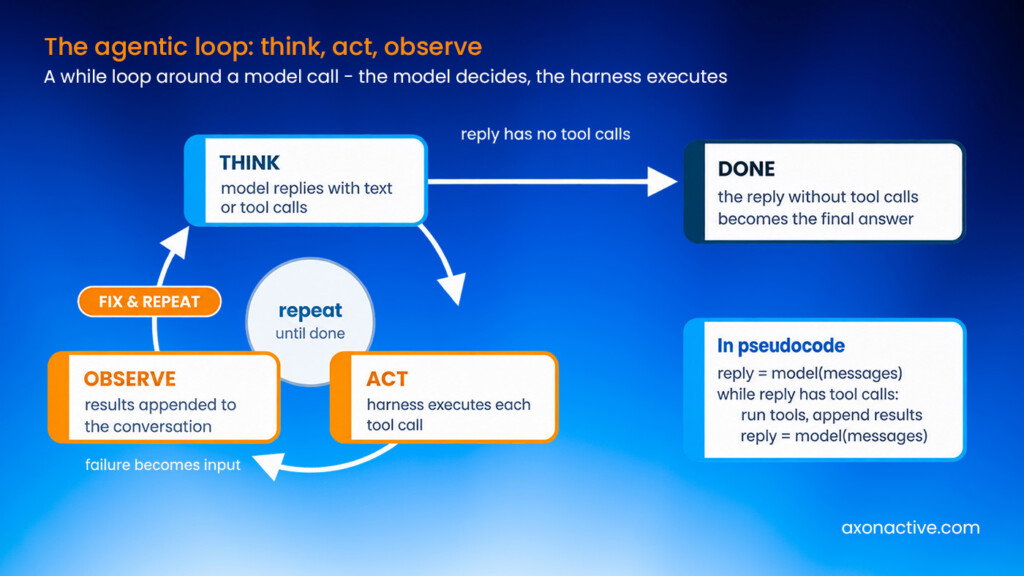
The intelligence lives in the model; the loop is deliberately dumb. One sentence from our curriculum captures the division of labor: the model never runs anything itself, and the harness never decides anything itself. The model writes a tool call as text. The harness performs it and reports back what happened.
A lab from our training shows what this buys you. We give an agent a small Python project with a broken format_duration function: minutes fail to roll over into hours, so 7,325 seconds prints as “2h 122m 5s”. The test suite is red. The prompt says only “Make all the unit tests pass.” We never mention the tests, the runner, or any steps. The agent lists the repository, reads the test file and the source, identifies the off-by-a-factor bug, edits one line, then runs the suite. Its first test invocation fails to discover the tests, so it tries another, and another, five variations in total, until the suite runs and reports green. Then it stops and summarizes the fix.
No one scripted that sequence. The loop kept feeding results back, and each failed observation became input for the next attempt. That self-correction on failure is what distinguishes an agent from a chatbot, and it comes from the harness, not from any special cleverness in the model.
Inside the agent harness: six parts, one request
Our current curriculum teaches the harness as six parts. Three of them you provide, one is the engine just described, and two sit after it as gates. Each part maps to concrete files and flags in whatever agent you use.
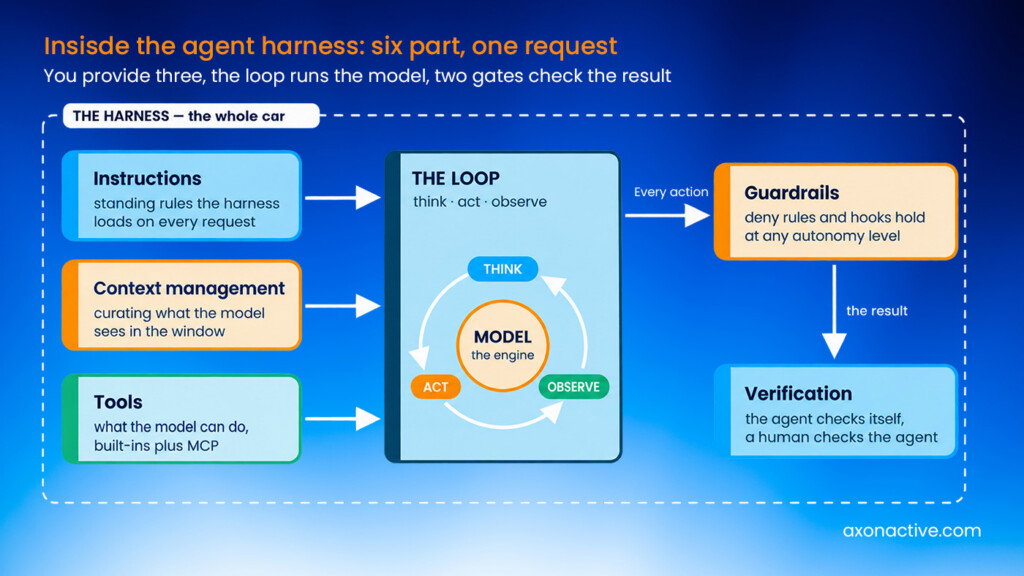
Instructions: the one control you hold
Instructions are the standing rules the harness loads for you on every request: repo-wide files such as.github/copilot-instructions.md, cross-tool agent files such as AGENTS.md and CLAUDE.md, personal files in your home directory, and organization policies set by an admin. A second kind loads only when a condition matches, for example path-scoped rules that apply to *.py.
Under the hood, all of them land in a system prompt the harness rebuilds from scratch on every request. That has a practical consequence we demonstrate live in training: edit the instruction file mid-session, and the very next turn obeys the new rule, because nothing is cached. It also means conflicting rules from different files simply stack, with no reliable winner. The recommendation we give engineers is to keep universal rules in the always-loaded files and reserve path-scoped rules for genuine exceptions.
Context management: what the model sees
The context window holds the system prompt, the tool definitions, and the growing conversation, and it fills up fast. A single trivial prompt in our labs already costs about 30,000 tokens before any work happens. The curriculum teaches six levers across a request’s life. You curate what goes in up front, the agent retrieves files just in time, and noisy subtasks get isolated in a sub-agent. Bulky output is offloaded to disk with a pointer, old turns are compacted into a summary when the window fills, and the session is persisted so a later run can resume it.
Curation alone is measurable. In one lab, a vague “add a currency formatting function” prompt made the agent hunt across the project and cost 216,700 tokens. The same request naming the target file cost 121,600. Telling the agent where things live, once, in an instruction file, buys that saving on every future task.
Tools: what the model can do
A tool is a function with a description. The model never sees the tool’s code; it sees the name, the description, and the input schema, all placed in the system prompt, and it picks tools by reading those descriptions. Coding agents ship with a set of built-ins for viewing, editing, searching, and shell access, and the Model Context Protocol (MCP) is the standard way to bolt on more.
The toolbox defines the agent’s entire capability. In a lab we ask an agent to read a local data file while giving it only a web search tool. It cannot invent file access. It searches, fails, and finally asks the human to paste the file contents into chat. Whatever question you have about what an agent can or cannot do, the answer is in its tool list.
Guardrails: how far it goes before it needs your yes
Autonomy needs limits, and the harness provides two kinds. The first is a dial: by default the agent asks before every action, and flags progressively open that up, to auto-approving tools, to full autonomy where nothing is asked. The second kind is a set of hard limits that hold wherever the dial sits. A deny rule on a tool blocks it even when all tools are allowed. A pre-tool-use hook goes further: it is your own script, run by the harness before every tool call, and its deny decision is final even in fully autonomous mode.
Our labs verify this the direct way. With everything allowed and a single deny rule on rm, the agent tries to delete a directory, is refused, and reports that it cannot bypass the policy. With a hook that blocks any command containing rm, the same holds in full-auto mode, and the agent’s workaround attempt through git rm is caught as well. Above all of this, an organization can push a managed policy so no one on the team can switch the safety rails off. Autonomy becomes something you engineer rather than something you hope for.
Verification: done is not the same as correct
When the agent says “done, tests pass”, it has claimed something, not proven it. We teach verification in two passes. The first is the agent’s self-check, and you can wire it into the harness: a standing instruction that any code change must come with unit tests makes the agent test itself without being asked per task. A stronger variant delegates review to a sub-agent that did not write the code. In our lab, the author agent reported five green tests for a cart subtotal function, and the independent reviewer flagged that the implementation used floats for money while the tests hid the precision drift with approximate assertions.
The second pass is the human check, and it stays mandatory. Read the diff, run the tests you trust, and decide whether to keep the change or send it back. The harness can put the diff in front of you and gate the merge, but responsibility for what ships does not transfer to the tooling.
Nine primitives, if you look under the hood
The six parts are the teaching view. When our curriculum goes a level deeper, it decomposes a harness into nine primitives: system prompt assembly, permissions, context management, tools, environment, hooks, sub-agents, persistence, and the loop. Two are set up before the loop starts, one is the loop itself, and six hang off it every turn.
Three of the nine deserve a word here because the six-part view folds them into larger topics. Sub-agents exist for context isolation, specialization, and parallel work: each child runs in its own clean window with its own role and toolset, and the parent receives only a summary instead of the noise. Persistence exists because models are stateless; the harness saves every session to disk so a crashed or interrupted run can resume where it stopped. The environment is the sandboxed workspace the tools execute in, with its permissions and its history.
The practical payoff of learning the primitives is portability. Whether you buy a harness (Claude Code, Cursor, GitHub Copilot, Codex, Kiro) or build one on a framework (LangGraph, CrewAI, Microsoft Agent Framework, the OpenAI or Claude Agent SDKs), the same nine primitives sit underneath. Once you know the primitives, any agent system is readable, whatever the platform calls its parts.
Why the harness decides whether AI coding works
When we ask engineers in training why an agent run went wrong, the answers almost never involve model intelligence. An ambiguous prompt combined with wide permissions is how an agent deletes the wrong files; the fix is guardrails and sharper instructions, both harness work. An agent that seems to forget the project’s conventions is missing an instruction file. A session that gets slower and dumber over hours is a context window that nobody compacted. Too many mounted tools crowd the window before work begins. Even timeouts often trace to physics: a weak local machine with slow disk I/O will stall an agent no matter how good the model is, because a harness cannot fix weak infrastructure any more than it can fix a weak model.
All of these failures are diagnosable and repairable, because the harness is ordinary engineering. Instruction files, hook scripts, deny rules, and verification conventions live in the repository, go through code review, and benefit the whole team from day one. That is also why our advice is to start with a bought harness and tune it, and to build a custom one only when a real problem demands it.
The models will keep changing under your feet. The harness is the part of AI-assisted development you can design, test, and improve, and in our experience it is where the difference between a demo and a dependable tool gets made.
From Principle to Practice
If your team is seeing the same split — strong results from some engineers, inconsistent ones from others, all on the same model — the gap is almost always in the harness, not the prompt. Whether you buy a harness like Claude Code or Cursor, or build one on a framework, the platform is only the starting point; what your team configures on top of it — instructions, guardrails, verification conventions — is what actually decides the outcome. That is the core discipline behind Axon Active’s AI-first software engineering practice: agent orchestration built on governed, reviewable harnesses that compound across model upgrades instead of resetting with every release.
Source
- Anthropic, “Building Effective Agents”: https://www.anthropic.com/research/building-effective-agents
- Model Context Protocol: https://modelcontextprotocol.io
- Yao et al., “ReAct: Synergizing Reasoning and Acting in Language Models”: https://arxiv.org/abs/2210.03629
- Related Axon Active articles: AI Changes the Practice. The Scrum Team Stays. · The Invisible Line Between Vibe Coding and Professional AI Engineering · Why AI Gains Are Real and Your Balance Sheet Doesn’t Show It
Frequently Asked Questions
What is an agent harness?
An agent harness is everything built around an AI model that turns it into a working agent: instructions, context management, tools, the loop, guardrails, and verification. The model generates text; the harness turns that text into inspected files, executed commands, passing tests, and reviewable diffs.
What is the difference between the model and the harness?
The model is a black box you rent from a provider: input goes in, output comes out, and it gets swapped for a newer version every few months. The harness is ordinary software you can read, version in git, test, and own. Work you put into the harness compounds across model upgrades, while prompt tricks tuned to one model’s quirks usually do not survive the next release.
How does the agentic loop work?
The harness sends the conversation to the model, which replies with text, tool calls, or both. The harness executes each tool call, appends the results to the conversation, and sends the whole thing back. It repeats until the model replies without requesting any tool, and that reply becomes the answer.
What are the six parts of an agent harness?
Instructions, context management, and tools are the parts you provide. The loop is the engine that runs the model, and guardrails and verification sit after it as gates. Each part maps to concrete files and flags in whatever agent you use.
Should you buy an agent harness or build one?
Start with a bought harness such as Claude Code, Cursor, or GitHub Copilot and tune it. Build a custom one on a framework only when a real problem demands it. The same nine primitives sit underneath either choice, so what you learn once transfers to every agent system.